
—————————————————————————————————-
 “ExperVision® has one big advantage: SPEED. This corporate-level OCR application processes faster than any product of its type we’ve ever tested: It converted a scanned image of a 700-page book into an editable Word file in a startling 6 minutes! ExperVision® is worth considering for enterprise-level high-volume, high-speed OCR “ “ExperVision® has one big advantage: SPEED. This corporate-level OCR application processes faster than any product of its type we’ve ever tested: It converted a scanned image of a 700-page book into an editable Word file in a startling 6 minutes! ExperVision® is worth considering for enterprise-level high-volume, high-speed OCR “ |
|
PC Magazine is registered trademarks of Ziff Davis Publishing Holdings Inc. |
—————————————————————————————————-
OCR Server for Enterprise Content Management (ECM)
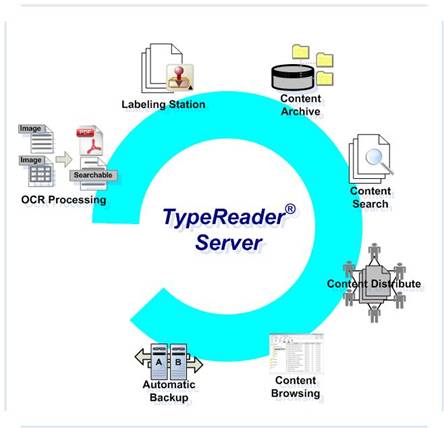
1.OCR Processing
Image Source: All the captured images and documents are stored in a directory structure of the Image Server, with pre-defined categories in a way similar to how the documents are kept in Client’s paper folders.
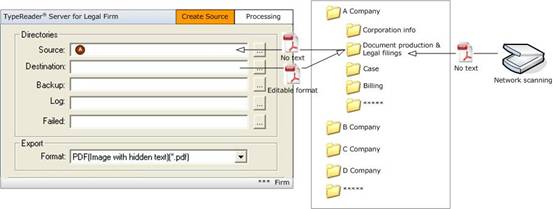
TypeReader® OCR Server Administrator™
We can customize TypeReader® Server’s documents processing workflow according to your business process and provide you with workflow configuration tools for you to adjust the system for your dynamic business needs.
TypeReader® OCR Server Manager™
After workflow is setup in OCR Server Administrator™ mode, TypeReader® OCR Server Manager™ will automatically respond to all tasks assigned by the users in your enterprise or in your customer group. OCR Server Manager™ continuously monitors data sources 24×7 for all tasks. When new images appear in the input folder, OCR Server Manager™ automatically starts one or more recognition processes and completes the tasks in real-time.
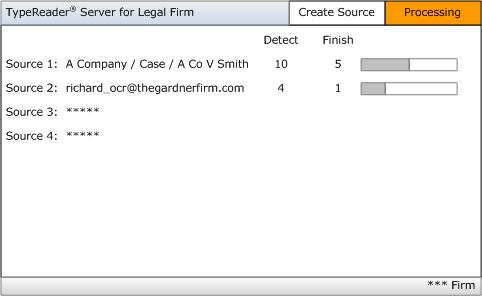
Recognition
TypeReader® Server can recognize major western languages including English, French, German, Italian, Spanish, Portuguese, Dutch, Swedish, Norwegian, Danish, etc. TypeReader® Server can recognize more than 2600 fonts. For normal books, magazines, office paper etc, TypeReader Server can recognize with extremely high OCR accuracy over 99.9%.
Format Conversion
TypeReader® Server can export OCR results in the following document formats:
- PDF Formats, e.g. Image only, Normal PDF, Image with Hidden Text – Searchable PDF
- Rich Text Format
- MS Excel
- MS Word
- ASCII (Comma Delimited or Tab Delimited)
- WordPerfect
- TypeReader Native Format, which allows you to do proofreading at any time
- TypeReader Text Only, which allows you to convert it to a format at a later time
- HTML
2.Labeling Station
TypeReader® Server can be configured for every batch of documents according to the documents’ storage location and content.
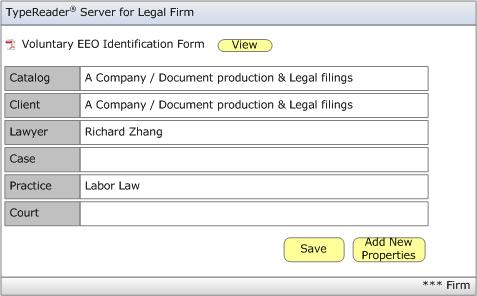
3. Content Browsing
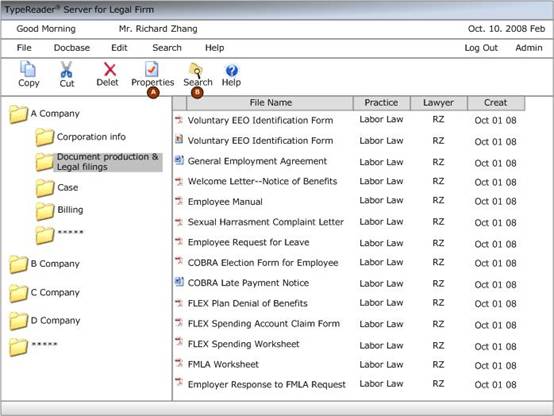
Users can visit TypeReader® Server; perform searching, viewing, editing, printing, reporting, labeling, linking and other functions through the company’s LAN and Explorer. The documents can then be shared among client’s company.
4. Application Integration
We also provide APIs and development services to make it possible for you to integrate TypeReader® Server into your document management, financial management, ERP and other business management systems, to automate your business process.